
No Secrets for Agents: Designing Identity and Permissions for the AI Era
Code identifies as a service account. Humans identify as themselves. Agents borrow – and the platform has to decide on whose behalf, with what scope, and audited as what.

Code identifies as a service account. Humans identify as themselves. Agents borrow. The platform has to decide from whom, with what scope, using which credentials, and audited as what.
TL;DR
The first wave of agents ran like developers on laptops: one user, one identity, full access, nothing to scope.
Enterprise agents are different. They run for many users, across many integrations, often when the user is not even online. They need delegated identity, scoped permissions, credential injection, workload identity, and audit trails that record who the agent acted for and what authority it used.
The rule is simple: agents should invoke credentials, never see them.
Identity is not a feature you add later. It is the layer the whole agent system stands on.
The identity crisis
Most agent demonstrations you see today run with the developer’s own identity. Claude Code uses your shell, your files, your GitHub token. Cursor opens your codebase. Claude Desktop, Codex use your Microsoft 365 user. The demos look impressive precisely because the auth layer has been collapsed to one person, in one environment, with full access to everything. And might need the user in front of the screen to grant approval or login.
Production looks different, and enterprise production looks different again. An enterprise agent mostly does not run interactively. It runs because a schedule fired, an event was raised, an app called it. The user it acts for may not be at a keyboard – they may not even be online. The CRM is preparing a morning briefing before they walk in; the calendar is fanning out research for an upcoming meeting; an inbox classifier is firing on each new email. None of these are user-prompted in the way a chat agent is. The interactive case is the easiest one to reason about. It is not the only one, and for many enterprise workflows it is not the dominant one.
In theory, when the agent acts, it should use authority delegated from the right user, respect that user’s permissions, and leave an audit trace that says who actually caused the action. In practice, most agents today are wired with a fixed API key or service identity that has nothing to do with the launching user. The user’s actual permissions often show up only when an interactive OAuth flow brought them in. Outside that case, the mismatch is common.
Replace “one developer on a laptop” with “a hundred users, each scoped differently, across a dozen integrations, with agents firing on their behalf while they sleep” and the entire problem changes shape.
The questions of identity, of permissioning, of credential handling – these were always there. The demo simply hid them.
Four questions in production
When an agent runs in production, four things need to be defined, and most agent frameworks I have seen treat them as somebody else’s problem.
Whose identity does the agent run as? The launching user? A service account? A scoped persona invented for the task? Each option has consequences. Run as the user and you inherit all their permissions, including ones they did not consent to expose. Run as a service account and you lose per-user accountability. Run as a scoped persona and you have to build the scoping infrastructure.
With what permissions? Static, decided at deployment time? Dynamic, requested per task? Per-tool, declared by what the agent is allowed to invoke? Per attributes matching the principal to a set of rules? In most current frameworks, the answer is “whatever permissions the API key was given when the developer set it up” – which is to say, all of them.
Using which credentials? OAuth tokens, API keys, browser cookies, TOTP codes for MFA. Each one needs to be passed to the right tool, at the right moment, without the agent ever seeing the value. I will say more on this later because it is the part often ignored.
Audited as whom? When the agent calls a tool, who is recorded as the actor? The user? The agent? Both, with delegation noted? The audit trail is what makes any of the above defensible after the fact – and it is also what tells you whether your agent is acting within bounds.
These four are not independent. They compose. The answer to one shapes the answer to the next.
Take a simple morning briefing agent.
It reads Salesforce, calendar events, recent emails, support tickets, and prior meeting notes before an account executive starts the day. That sounds harmless. But each system has a different identity and permission story. Salesforce may be scoped by account ownership. Email may be scoped to the user. Support tickets may be scoped by team. Opportunities by territories. Calendar data may be private. The agent is one run, but the authority behind each tool call is not the same.
That is where the four questions stop being theoretical.
The cardinal rule: agents must never see secrets
Here is the rule I would like every agent platform builder to internalize. The agent must never, under any circumstance, see the plaintext value of a credential.
Not the OAuth token, the Salesforce API key, the browser password, the TOTP seed – none of it.
The reason is mundane and terrifying at the same time. Agent conversations are usually instrumented heavily: traces, observability platforms, audit stores, debugging dashboards, sometimes provider logs. If a token enters the model context, it has crossed into systems that were never meant to hold secrets. Even if every vendor behaves correctly, you have created the wrong boundary.
So the architecture has to do something different. The model needs a way to invoke a credential without ever reading it.
The pattern, concretely, looks like this. The model issues a tool call with a logical reference – “call web_search with this query”. The tool runtime, server-side, looks up the credential associated with that integration for the current project. The runtime decrypts it (fetched on demand from the vault). It calls the external API directly with the decrypted credential in the request. The response is sanitized and returned to the model. The model sees the result. It never saw the key.
At Vertesia, this is what our agent harness natively does for every tool that needs an external credential. The function lives in a place the model cannot reach. The decrypted value lives, for the duration of a single API call, in memory. Then it is gone.
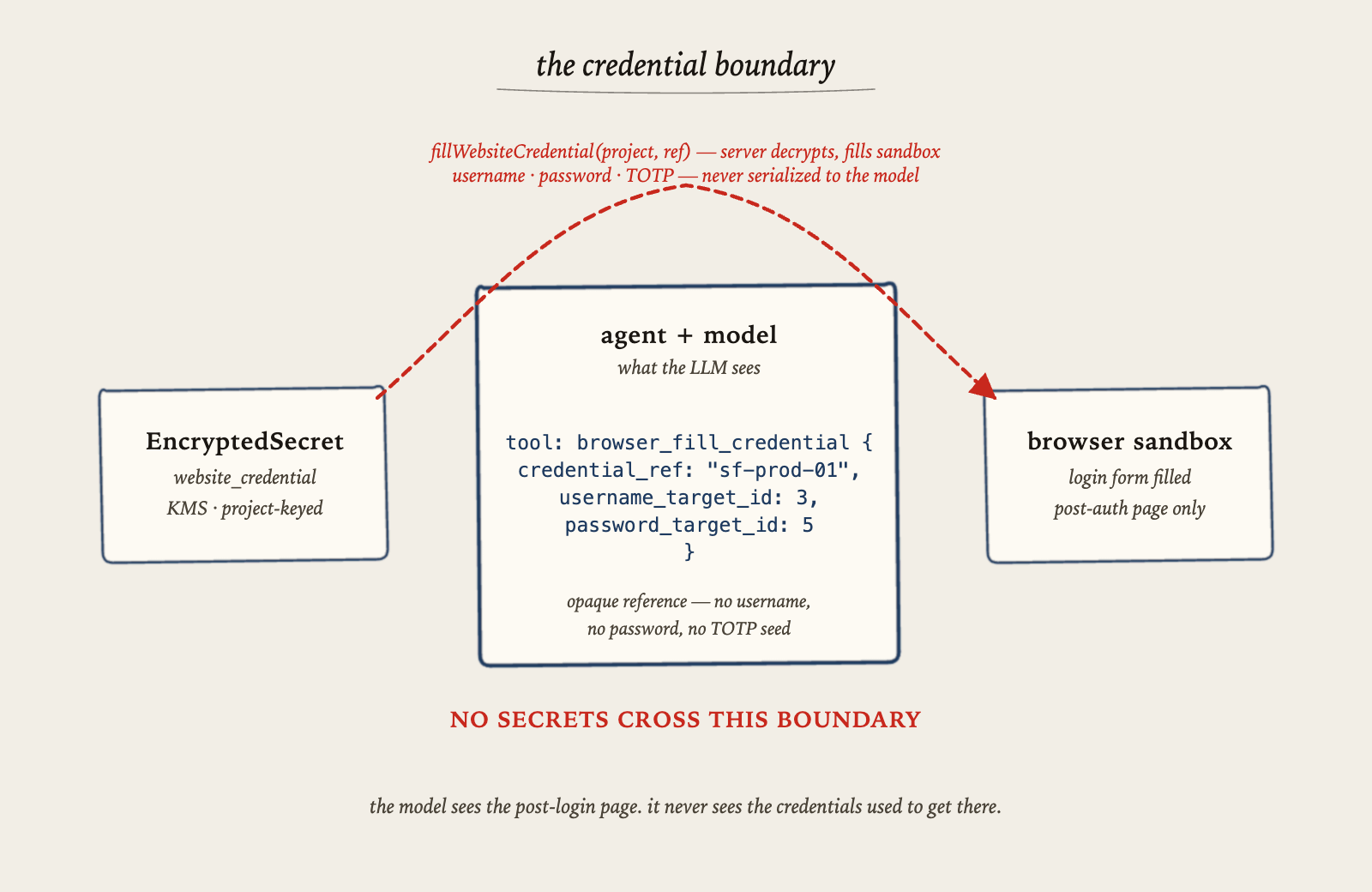
For browser-based agents – where there is no clean OAuth and the only way in is to type the password – the principle is the same. Our browser-sandbox endpoint takes a credential reference, loads the website credential server-side, generates a TOTP code from the encrypted seed, fills the form fields directly into the sandbox via a non-LLM API. The model can request that an action happens; it cannot see the materials used to perform it.
This is basically the same shape as the secret-handling pattern that proper backend systems have used for years. The novelty is that it has to work even when an LLM is in the middle of the loop.
Why MCP auth is not the whole auth problem
MCP now has an authorization story, and that is good.
But it addresses one boundary: the MCP client talking to the MCP server. It does not automatically answer the harder production question: once a tool is invoked inside an agent run, whose authority is being used downstream, what credential is consumed, what scope applies, and who is recorded as the actor.
That is the gap.
A tool description tells the model what the tool does. In production, the platform also needs a permission contract: what scope the caller needs, what identity the action runs under, whether the tool consumes a user token, a workload token, a project secret, or no credential at all, and what audit event must be emitted.
Without that, the model sees a function. The system has not defined the authority behind the function.
The interactive OAuth flow is only one part of the problem. It works well when the user is present to authorize an integration, and refresh tokens can keep the agent running afterward without the user online. But production agents also run in contexts where there is no fresh consent moment, no single user at all, or no clean OAuth path to begin with. Those are different design problems, and I will come back to each.
Four contexts, four auth shapes
The auth pattern depends on how the agent was triggered. There are roughly four contexts, and each one needs a different shape:
Interactive – the user is at the keyboard, can authorize an OAuth flow on demand, can respond to MFA prompts. Common in chat and copilot products. It is the easiest case to reason about, but not the only one production systems have to support.
User-launched, non-interactive – the user clicked a button in an app and walked away. The agent acts as them but cannot ask for fresh consent. Needs stored OAuth tokens, captured during a prior authorization.
App- or event-triggered – the CRM prepares the morning brief, the calendar fans out reminders, an inbox classifier fires on each new email. The user is identified by the calling app’s context, but is often not online at all when the work runs.
Background, no specific user – system-level work on a schedule. Overnight ingestion, claim processing preparation, task scheduling. Needs workload identity, not user delegation.
These compose. A single agent run can cross contexts mid-execution – started by a schedule, picking up a user’s stored OAuth tokens for a specific tool, falling back to a browser harness when one integration has no API at all. The auth layer has to compose with them.
These are not edge cases. They are the normal shape of production agent systems, and for that matter, that any user is using – even if not conscious of these.
Identity bound at invocation
The first thing you have to give up: the idea that an agent has a fixed identity baked in at deployment time.
In production, an agent must be bound to an identity at invocation. The launching user, the project they are working in, the scope of the task they asked for – these are inputs to the run, not configuration of the system. The agent’s effective identity is constructed each time it starts work.
At Vertesia, every agent run starts with a scoped token generated by our Secure Token Service. The token carries the user’s identifier, the project context, the agent’s principal type (we have Agent as a first-class value alongside User, ServiceAccount, ApiKey, Group), and the set of role-derived permissions the user actually holds in that project. TTL is bounded, in the order of an hour, refreshed as needed. The token is what every downstream activity uses to talk to our APIs.
This is core security infrastructure, transparently shared by all agents. It lets us answer the four questions above in code, instead of by convention.
Permissions as a first-class layer
The permission model itself has to exist before the agent layer can call into it. At Vertesia we use a hierarchy of scopes – about forty of them – covering everything from interaction:execute and workflow:run to project:settings_write and content:admin. Roles aggregate scopes. Users inherit roles from group memberships. Every API endpoint declares the permission it requires with a decorator.
This is the easier half of permissioning, and it is mostly shipped: when an agent calls our API on behalf of a user, the JWT carries the user’s scopes, and the endpoint either honors or rejects the call.
The harder half is per-tool, per-action gating inside the agent run.
The model decides to invoke a tool. Before execution, the runtime should check whether the current principal can perform that action, with that credential, in that context.
We have the principal context and the permission registry. We do not yet route every tool invocation through that check before execution. That gap is on our roadmap. I suspect it is on everyone’s roadmap who has thought seriously about this.
Invoice processing is the simple business example. An agent may be allowed to read an invoice, extract supplier, amount, and purchase order, match it against the PO, and recommend approval. That does not mean it should be allowed to release payment. The extraction permission, the recommendation permission, and the payment permission are different actions. If the model crosses that line, the system will deny it. Relying on prompting to tell what the agent can and cannot do is wishful thinking – very far from any remotely serious security principles.
OAuth: authorize once, invoke many times
This is the workhorse pattern for the user-launched and app-triggered contexts. Modern integrations – Salesforce, Google Workspace, Slack, the usual serious systems – use OAuth 2.0. The user authorizes once, interactively; an access token plus a refresh token are issued and stored; the agent reuses them across runs until they expire or are revoked.
This is what makes OAuth tractable for non-interactive agents. The interactive consent step happens between the user and the provider, exactly once. After that, the agent uses the stored token, and refreshes it on its own when it gets close to expiry. The user does not need to be online, or even aware, when the agent runs.
At Vertesia, the OAuth tokens we hold on behalf of users are stored in a secret vault. A small token-refresh utility fetches new access tokens before each tool call, persists them, and returns the fresh one to the activity that needed it. The agent never sees the token or the secret reference; it just calls the tool. And can only request secret it has been authorized to (for example, in this case, the tokens for the enabled integration and the user it is running on behalf of).
Crucially, the scope of the OAuth grant lives with the token. If the user only authorized read access to their calendar, the agent inherits exactly that. The provider enforces what the platform cannot, at the level of the underlying API.
When there is no user: workload identity
OAuth-on-behalf-of-a-user is most of the story for the first three contexts, but not all of it. A real agent platform also runs agents that have no specific user behind them – overnight ingestion runs, scheduled enrichment jobs, system-level agents that maintain the platform itself. For these, there is no human to authorize a flow, and there should not be.
What you need then is a workload identity, not a user identity. The agent runs in a controlled environment and that environment vouches for it. The pattern that has matured outside of the AI world for this is Workload Identity Federation, or WIF: instead of long-lived service account keys sitting in config, the workload exchanges the cryptographic identity its environment grants it for a short-lived, scoped token, just in time. No secret to rotate, nothing to steal from a leaked .env, no static credential to find in a stack trace.
Bringing this into the agent layer is, in practice, an extension of the token infrastructure you have already built for users. The same token server pattern that issues scoped tokens for an interactive run should extend to workload runs, with a different principal type and a different set of allowed scopes. The audit trail records workload identities alongside user identities, with the same delegation chain rules. The tool runtime treats them the same: secret references are dereferenced server-side, credentials never reach the model, audit fires on every call.
What this requires, plainly, is that you have a token service to begin with. If your auth strategy is “API keys in environment variables”, there is no machinery to extend; you have to build it before you can issue workload tokens, and you have to build it well enough that user tokens and workload tokens live in the same identity model. The investment you make in the user case pays back when you reach the non-interactive case, which you will.
Browser and legacy APIs
For legacy systems, the business case is usually boring and unavoidable: a supplier portal, an insurance portal, a government form, a banking interface, a line of business application, an industry-specific website with no usable API. There are a lot of these. There will continue to be a lot of these, for a long time.
For browser-based access, the agent does not log in directly. The harness does. It loads a website credential from the encrypted store – username, password, TOTP seed, sometimes an OAuth reference – and submits the login form into a sandboxed browser. The agent then operates the post-login session, driving the page, but the credential itself never enters the agent’s conversation.
For MFA, TOTP seed can be registered, and dynamically used to let agents get a one time code and use it: the seed is encrypted at rest, the code is generated server-side at the moment of fill, and only the time-limited six digits ever appear in the sandbox.
Audit and the delegation chain
Every action an agent takes needs to be attributable, after the fact, to a user, a session, a permission grant.
The audit trail has to carry the delegation chain. Not just “the agent did X”, but “the agent, running on behalf of user Y, in project Z, using credential C, at time T, did X – and the call succeeded (or failed) with status S”. Without that level of granularity, you cannot answer questions a security or compliance review will absolutely ask you. And yes it should be clear that an action has been made by an agent, on behalf of a user, and not by the user itself.
A concrete case: an agent updates the renewal status of a customer in Salesforce. The audit trail should not only say that a workflow updated Salesforce. It should say that the agent run updated Salesforce on behalf of user Y, using tool update_customer, and that the update succeeded (or failed). Without that, the next compliance review is an excavation, not a query.
At Vertesia, every sensitive action – secret creation, OAuth token use, credential fill into a browser sandbox, project settings change – flows through an audit pipeline that lands in a queryable analytics store. The fields include the account, the project, the principal, the action, the resource, the status, the timestamp, and a structured details payload. Delegation is captured by recording the effective principal – the agent run – separately from the originating user.
This is not shiny, I admit, but it is the part that turns a useful demo into a defensible product.
What it actually means to implement security
I want to be plain about what doing this well requires. It is not one feature. It is a small number of layered systems, each one of them essential.
A scoped identity model with first-class agent principals, for both users and workloads. A token service that issues bounded credentials per invocation. A permission registry the API and the agent runtime both consult. An encrypted secret store with envelope encryption and KMS-backed key management.
Then the runtime pieces: a tool runtime that injects credentials at the boundary so the model never touches them, an OAuth flow with stored tokens and automatic refresh, a workload-identity flow (WIF) for the non-interactive case, a browser harness that mediates legacy credential flows on the agent’s behalf, and an audit pipeline that captures every privileged action with delegation.
None of these is exotic on its own. What is new is that they have to compose under an LLM, and the LLM has to be kept on the outside of the credential boundary at every step. The architectural challenge is less the construction of each piece than the discipline of where the model is allowed to be – and where, just as importantly, it is not. The runtime that actually enforces this composition – tools as activities, credential injection at the boundary, audit per call – is the agent harness, which I will cover in mode details in an upcoming blog.
Identity and security are not features you can add later
You can build a working agent on a laptop without thinking about any of this. Even deploy it in sandboxes. You can ship a demo on top of a single API key and a developer’s credentials.
What you cannot do is take that same agent into production for real customers, real users, and real compliance obligations, and patch identity in later. The auth layer has to be designed from the start, because every other part of the agent stack will sit on top of it and assume it works.
Code identifies as a service account. Humans identify as themselves. Agents borrow. The job of an agent platform is to make sure they borrow with intention: the right identity, the right scope, the right credentials, and the right audit trail.
And above all: the model in the middle should never see the credential being borrowed. Keep the secrets out of its mind.